Password Strength Checker
Welcome to CyberKannadig, your trusted platform for online security! At CyberKannadig, we’re dedicated to helping you protect your digital life with easy-to-use tools and expert advice. Our Password Strength Checker is a free tool that lets you create strong, hacker-proof passwords in seconds. Whether you’re setting up a new account or updating an old password, this guide will show you how to use the Password Strength Checker on the CyberKannadig website and why it’s your go-to resource for staying safe online.
🔒 Password Strength Checker
- ✔️ At least 6 characters
- ✔️ Lowercase letters
- ✔️ Uppercase letters
- ✔️ Numbers
- ✔️ Symbols
Why Use the CyberKannadig Password Strength Checker?
A strong password is your first defense against cyber threats. The Password Strength Checker on CyberKannadig makes it simple to craft secure passwords with real-time feedback. Here’s why users love our tool:
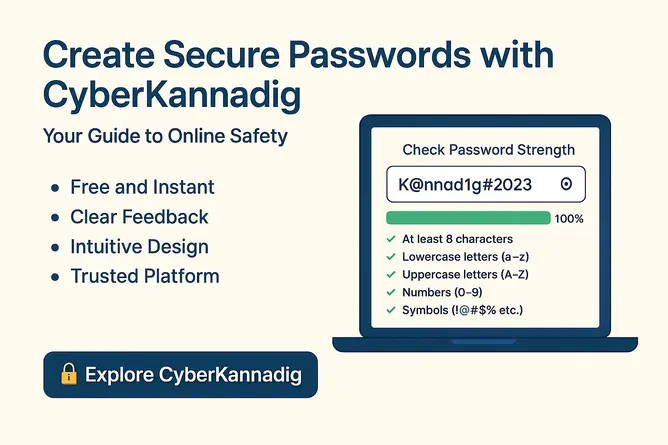
- Free and Instant: Use it anytime on the CyberKannadig website without signing up.
- Clear Feedback: Get immediate insights into your password’s strength as you type.
- Intuitive Design: Visuals like a strength bar and checklist make it easy to improve your password.
- Trusted Platform: CyberKannadig offers reliable tools and tips to keep you secure online.
Ready to create a strong password? Let’s walk through how to use the Password Strength Checker on CyberKannadig!
How to Use the CyberKannadig Password Strength Checker
The Password Strength Checker on CyberKannadig evaluates your password based on key security criteria, helping you ensure it’s strong enough to protect your accounts. Follow these steps to get started:
1. Visit the CyberKannadig Website
Head to the CyberKannadig website and find the Password Strength Checker. It’s typically on the homepage or in the “Tools” or “Security” section. Look for an input box labeled “Check Password Strength” with a clean, modern design.
2. Enter Your Password
- Click into the input box and start typing your password.
- The checker analyzes your password instantly as you type—no need to press any buttons!
3. Review the Feedback
As you type, the Password Strength Checker provides three types of feedback to guide you:
- Strength Message: At the top, you’ll see a rating like:
- “Weak 😟 (Needs improvement)” in red
- “Medium 🙂 (Almost there)” in yellow
- “Strong 💪 (Excellent!)” in green
- Strength Bar: A progress bar below the input box fills up (0% to 100%) to show your password’s strength. Red indicates weak, yellow is medium, and green is strong.
- Criteria Checklist: A list below the bar checks for:
- ✓ At least 8 characters
- ✓ Lowercase letters (a-z)
- ✓ Uppercase letters (A-Z)
- ✓ Numbers (0-9)
- ✓ Symbols (!@#$% etc.) Green checkmarks show what you’ve achieved; red items highlight what’s missing.
4. Toggle Password Visibility
- Need to check your typing? Click the eye icon (👁️) next to the input box to show your password.
- Click again (🙈) to hide it for privacy.
5. Strengthen Your Password
If your password is weak or medium, use the checklist to improve it:
- Add more characters if “At least 8 characters” is red.
- Include special characters like @ or # if “Symbols” is red. A strong password will display a green bar, a “Strong 💪” message, and all green checkmarks.
Example Passwords
- Weak: “kannadig” (too short, no variety) → Red bar, “Weak 😟”
- Medium: “Kannadig123” (missing symbols) → Yellow bar, “Medium 🙂”
- Strong: “K@nn@d1g#2023” (meets all criteria) → Green bar, “Strong 💪”
Why CyberKannadig is Your Go-To for Security
At CyberKannadig, we’re more than just a password tool—we’re your partner in online safety. Here’s what sets us apart:
- Free Tools: Our Password Strength Checker is always free and accessible.
- Expert Resources: Explore our blog for guides like “Top Cybersecurity Tips” or “How to Create Strong Passwords.”
- SEO-Optimized Content: Find articles that help you stay informed and boost your online knowledge.
- Works on Any Device: Use our tools on your phone, tablet, or computer with ease.
By choosing CyberKannadig, you’re taking a step toward safer online accounts while engaging with a trusted, user-focused platform.
Tips for Creating Strong Passwords with CyberKannadig
- Go Longer: Aim for 12+ characters for extra protection.
- Mix It Up: Combine uppercase, lowercase, numbers, and symbols.
- Avoid Common Words: Skip predictable terms like “password” or your name.
- Unique Passwords: Use the CyberKannadig Password Strength Checker to create a unique password for each account.
Troubleshooting
- Tool not loading? Refresh the page or try a different browser.
- Password not strong enough? Check the red checklist items and add the missing elements.
- Need help? Contact the CyberKannadig team through the CyberKannadig website contact page.
Stay Safe with CyberKannadig Today!
Don’t risk weak passwords that leave your accounts vulnerable. Visit the CyberKannadig website to use our Password Strength Checker and create passwords that keep hackers at bay. Whether you’re securing your email, social media, or online banking, CyberKannadig has the tools and tips to keep you safe. Check out our blog for more cybersecurity advice and start building a safer online presence!
🔒 Explore CyberKannadig now! Test your passwords, learn expert security tips, and stay protected with CyberKannadig.